

Exercice
Introduction
json
{
  "producerId": "17957",
  "name": "N+1",
  "period": {
    "start": "2024-01-01",
    "end": "2024-12-31",
    "duration": 12,
    "closed": null
  },
  "state": "open",
  "additionalProducerProperties": {
    "lettering": "MULTI"
  }
}
Lorsqu'un exercice est clôturé, la propriété closed sera complété comme suit;
json
{
  "at": "2023-11-10",
  "by": {
    "producerId": "622",
    "firstName": "BENOIT",
    "lastName": "GARIAZZO"
  }
}
La propriété by correspond à l'id, nom et prénom de l'utilisateur ayant clôturé l'exercice.
Nommage
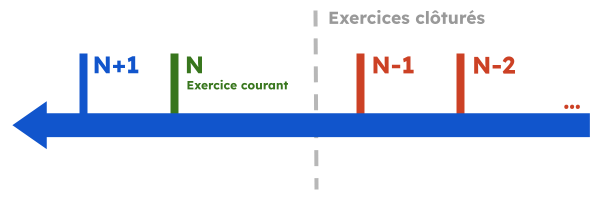
Les noms d'exercices sur MyUnisoft sont générés dynamiquement (N+1, N, N-1 ...). Le N étant l'exercice en cours.
Lettrage des exercices
Les exercices MyUnisoft peuvent être ouverts avec l'une des deux méthodes de lettrage suivantes;
- MONO (En mono les à nouveaux sont détaillés et ils sont lettrables)
- MULTI (En multi les à nouveaux ne sont pas détaillés et ne sont pas lettrables, on lettre les écritures d'origine)
MONO est la valeur par défaut lors de la création d'un exercice.
Interfaces
TypeScript
ts
interface Exercice {
  producerId: string;
  name: string;
  period: {
    start: string;
    end: string;
    duration: number | null;
    closed: null | {
      at: string;
      by: {
        producerId: string;
        firstName: string;
        lastName: string;
      }
    }
  }
  state: "closed" | "open";
  additionalProducerProperties: {
    lettering: "MONO" | "MULTI"
  }
}
JSON Schema
json
{
  "$schema": "http://json-schema.org/draft-07/schema#",
  "additionalProperties": false,
  "type": "object",
  "properties": {
    "producerId": {
      "type": "string"
    },
    "name": {
      "type": "string"
    },
    "period": {
      "type": "object",
      "properties": {
        "duration": {
          "type": "number",
          "description": "duration in months of the exercice",
          "nullable": true
        },
        "start": {
          "type": "string",
          "description": "Date with the format YYYY-MM-DD"
        },
        "end": {
          "type": "string",
          "description": "Date with the format YYYY-MM-DD"
        },
        "closed": {
          "type": "object",
          "properties": {
            "at": {
              "type": "string",
              "description": "Date with the format YYYY-MM-DD"
            },
            "by": {
              "type": "object",
              "properties": {
                "producerId": {
                  "type": "string"
                },
                "firstName": {
                  "type": "string"
                },
                "lastName": {
                  "type": "string"
                }
              },
              "required": [
                "firstName",
                "lastName",
                "producerId"
              ]
            }
          },
          "nullable": true,
          "required": [
            "at",
            "by"
          ]
        }
      },
      "required": [
        "start",
        "end"
      ]
    },
    "state": {
      "type": "string",
      "enum": [
        "closed",
        "open"
      ]
    },
    "additionalProducerProperties": {
      "type": "object",
      "properties": {
        "lettering": {
          "type": "string",
          "enum": [
            "MONO",
            "MULTI"
          ]
        }
      },
      "required": [
        "lettering"
      ]
    }
  },
  "required": [
    "name",
    "period",
    "state",
    "additionalProducerProperties",
    "producerId"
  ]
}Compatibilité TRA
Exercice (EXO). Page 17 de la spécification.
| nom de la colonne | position | chemin de la propriété MyUnisoft |
|---|---|---|
| FIXE | 1 | N/A |
| IDENTIFIANT | 4 | EXO |
| CODE | 7 | name |
| DATEDEBUT | 10 | period.start |
| DATEFIN | 18 | period.end |
| ETATCPTA | 26 | state |
| LIBELLE | 32 | Exercice au period.end.format("DDMMYYYY") |
| ETATANO | 67 | additionalProducerProperties.lettering |
| DATECREATION | 70 | period.start |